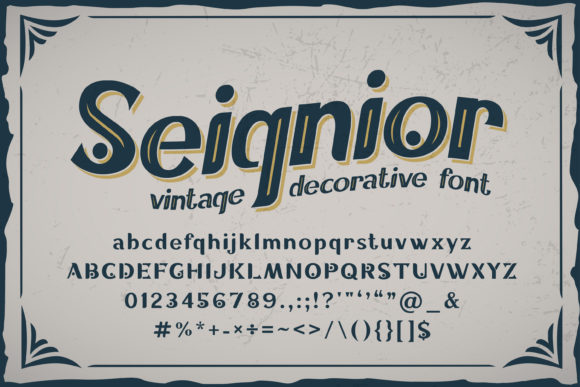
Seignior: Integrating a Vintage Display Font into Modern Design Workflows
In the landscape of digital typography, selecting a typeface is rarely just an aesthetic choice; it is a strategic decision that impacts readability, brand identity, and user engagement. For designers, marketers, and content creators seeking to inject personality without sacrificing legibility, Seignior offers a compelling solution. This daring and vintage-styled display font reads as strong, confident, and dynamic, providing tons of nostalgic character to your designs. However, integrating such a distinct typeface requires more than simply dragging and dropping it onto a canvas. It demands a thoughtful approach to workflow, ensuring that the font’s bold personality enhances rather than overwhelms the message.
This guide explores how Seignior fits into practical design processes, from initial concept development to final asset preparation. By understanding its structural nuances and stylistic weight, professionals can leverage this font to create impactful visual hierarchies while maintaining efficiency in their daily operations.
Understanding the Role of Seignior in Visual Hierarchy
Seignior is not a body text font. Its primary function lies in establishing immediate visual impact. When used correctly, it serves as a powerful anchor for headlines, titles, and key messaging elements. The font’s vintage styling evokes a sense of history and authenticity, which can be particularly effective for brands looking to convey heritage, craftsmanship, or timeless quality.
From a workflow perspective, recognizing Seignior’s role early in the planning phase prevents common pitfalls. Many designers fall into the trap of overusing display fonts, leading to cluttered layouts that fatigue the reader. To avoid this, treat Seignior as a high-value asset reserved for moments that require emphasis. It should appear sparingly, acting as the "hero" element in a composition. This restraint ensures that every instance of the font carries weight, reinforcing the confidence and dynamism inherent in its letterforms.
Compatibility with Supporting Typefaces
One of the most critical aspects of using Seignior is pairing it with complementary fonts. Because Seignior is visually loud, it requires a neutral counterpart to balance the composition. Sans-serif fonts with clean lines or simple serif faces often work best as secondary typefaces. These supporting fonts handle the bulk of informational text, allowing Seignior to shine in larger sizes without competing for attention.
When building a typographic system, test these pairings across various mediums. A combination that looks balanced on a desktop monitor may lose its harmony when scaled down for mobile devices or printed on small tags. Consistency in pairing also helps maintain brand coherence across different platforms, whether you are designing a website header, a social media graphic, or a print brochure.
Preparation and Asset Management
Before integrating Seignior into a project, proper preparation ensures a smooth execution. This involves verifying file formats, licensing agreements, and technical specifications. Unlike standard web fonts, display fonts like Seignior often come in multiple weights and styles, each suited for different contexts. Understanding the full scope of the font family allows for greater flexibility in design decisions.
- File Format Verification: Ensure you have access to both web-ready formats (such as WOFF2) and print-ready formats (such as PDF or high-resolution PNG). This dual availability supports cross-platform consistency.
- Licensing Clarity: Verify that your license covers all intended uses, including commercial projects, digital ads, and merchandise. Misunderstanding licensing terms can lead to legal complications later in the workflow.
- Font Testing: Preview the font at various sizes and resolutions. Display fonts can sometimes suffer from rendering issues if not properly optimized, especially when used with thin strokes or intricate details.
Organizing these assets within your project management tools or design software libraries streamlines the creative process. By categorizing Seignior alongside other approved brand assets, you reduce the time spent searching for files and minimize the risk of using incorrect versions.
Implementation in Digital and Print Workflows
The application of Seignior varies depending on the medium. In digital environments, where screen real estate is limited and attention spans are short, the font’s dynamic nature can cut through noise effectively. In print, the tactile quality of the vintage style adds depth and texture that screens cannot replicate. Adapting your workflow to accommodate these differences is essential for achieving high-quality outcomes.
Digital Integration Strategies
For web designers, implementing Seignior requires careful consideration of performance and accessibility. Loading large display fonts can slow down page speeds, negatively impacting user experience and SEO rankings. To mitigate this, use font-subsetting techniques to include only the characters necessary for your specific content. Additionally, implement fallback fonts in your CSS to ensure graceful degradation if Seignior fails to load.
In social media graphics, Seignior excels at capturing attention in crowded feeds. Use it for short, punchy headlines that complement engaging visuals. Avoid placing too much text within the image itself; let the font do the heavy lifting for the headline while the caption provides context. This division of labor respects the viewer’s cognitive load and encourages interaction.
Print Production Considerations
When preparing Seignior for print, focus on resolution and color contrast. Vintage fonts often feature intricate details that can blur if printed at low DPI. Aim for a minimum of 300 DPI to preserve the sharpness of the letterforms. Furthermore, consider how the font interacts with background colors. Darker shades of Seignior against light backgrounds typically offer better readability, while lighter shades can serve as subtle watermarks or background textures.
Collaboration with printers is another key step. Share proof files that clearly indicate where Seignior is used, along with any special instructions regarding ink coverage or paper texture. This communication ensures that the final product matches your digital vision, preserving the strong and confident feel of the typeface.
Maintaining Consistency Across Projects
For freelancers, agencies, and small business owners, consistency is paramount. Using Seignior sporadically can dilute its impact and confuse brand recognition. Establishing clear guidelines for when and how to use the font helps maintain a cohesive identity across all touchpoints. Create a style guide that documents preferred pairings, size ranges, and spacing rules.
Regular audits of existing materials can help identify inconsistencies. Look for instances where Seignior has been stretched, distorted, or paired with incompatible fonts. Correcting these issues reinforces the professional quality of your work and aligns your output with the confident, dynamic character the font was designed to convey.
Evaluating Outcomes and Iterating
The effectiveness of Seignior in your designs should be measured by its ability to communicate the intended message clearly and memorably. Gather feedback from peers, clients, or target audiences to assess how the font influences perception. Does it evoke the desired sense of nostalgia? Is it legible enough to facilitate quick comprehension?
Use this feedback to refine your approach. If users report difficulty reading certain headlines, adjust the size or contrast. If the font feels out of place in a specific context, reconsider its application. Continuous iteration ensures that Seignior remains a versatile and valuable tool in your design arsenal, adapting to changing trends while retaining its core strengths.
Conclusion
Seignior is more than just a decorative element; it is a strategic asset that can elevate the visual narrative of your projects. By understanding its characteristics, preparing assets meticulously, and integrating it thoughtfully into your workflows, you can harness its power to create designs that are both striking and functional. Whether you are launching a new brand, updating a website, or creating marketing materials, Seignior offers the confidence and character needed to stand out in a crowded digital world.
Embrace the vintage charm and dynamic energy of Seignior, but always ground its use in practical design principles. Let it serve as a beacon of style and substance, guiding your audience through your content with clarity and impact. In doing so, you transform a simple font choice into a cornerstone of effective communication.