Dream Quacker: Integrating Bold Retro Typography into Modern Design Workflows
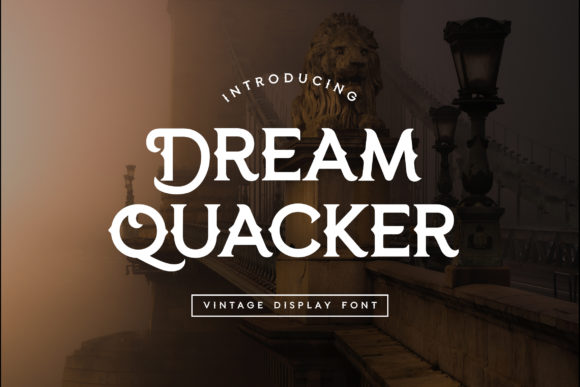
In the landscape of digital design, typography is rarely just about readability; it is a primary vehicle for tone, brand identity, and emotional resonance. Among the myriad of typefaces available to professionals and hobbyists alike, Dream Quacker stands out as a distinct choice for projects requiring immediate visual impact. It is not a subtle background texture or a neutral sans-serif meant for dense body copy. Instead, Dream Quacker is a bold and retro style display font that reads as strong, confident, and dynamic. Its inherent character adds tons of nostalgic flair to designs, making it an invaluable asset when used with strategic intent.
For designers, marketers, and content creators aged 20–50, integrating a specific typeface like Dream Quacker requires more than simply dragging it onto a canvas. It involves understanding where this font fits within the broader creative process, how it interacts with other visual elements, and how it can be leveraged to achieve specific business or artistic outcomes. This guide explores the practical implementation of Dream Quacker, focusing on workflow integration, compatibility, and long-term consistency.
Understanding the Aesthetic Positioning
Before diving into technical implementation, it is crucial to define what Dream Quacker actually communicates. The font’s retro styling evokes mid-century modernism, vintage advertising, and classic Americana. When you deploy this font, you are signaling confidence. It does not whisper; it projects. This makes it particularly effective in environments where standing out from the noise is the primary objective.
However, this strength comes with constraints. Because Dream Quacker is a display font, it demands space. It cannot compete with cluttered layouts or competing heavy weights. In your planning phase, you must acknowledge that this font will dominate the hierarchy. If your goal is to create a balanced, multi-layered information architecture, Dream Quacker should serve as the anchor, not the foundation. Recognizing this dynamic early prevents common layout errors such as visual fatigue or unreadable headlines.
The Role of Nostalgia in Modern Branding
Nostalgia is a powerful tool in marketing, often triggering positive associations with authenticity and reliability. Dream Quacker taps into this psychological trigger effectively. For small business owners and entrepreneurs looking to establish a brand voice that feels established yet fresh, this font provides a shortcut to that perception. It suggests heritage without requiring decades of actual history.
When using Dream Quacker to evoke nostalgia, consistency is key. The "retro" label can mean many things—from 1970s funk to 1950s diner aesthetics. Dream Quacker leans toward a clean, bold retro look. Ensure that your accompanying imagery, color palettes, and graphic elements align with this specific era of inspiration. Mixing this font with overly futuristic or minimalist tech imagery can create cognitive dissonance, undermining the cohesive narrative you are trying to build.
Integration into the Creative Workflow
Implementing Dream Quacker smoothly into your workflow requires attention to detail during the preparation and execution phases. Here is how this font interacts with standard design processes.
Pre-Production: Asset Preparation and Licensing
The first step in any typography-heavy project is securing the right assets. Dream Quacker is typically available through major font marketplaces. Before beginning your design, verify the license terms. Are you using it for personal projects, client work, or commercial merchandise? Understanding the licensing structure prevents legal complications later in the production cycle.
Additionally, prepare your design environment. If you are working in vector-based software like Adobe Illustrator, ensure that the font files are properly installed and synced across your devices. For web-based workflows, consider how the font will be served. While display fonts are often hosted locally due to their file size and unique nature, ensure that fallback fonts are selected to maintain structural integrity if the custom font fails to load.
During Production: Hierarchy and Contrast
Once the design phase begins, the interaction between Dream Quacker and other elements becomes critical. The most common mistake users make is underutilizing contrast. To let Dream Quacker shine, pair it with simplicity.
- Pairing Strategies: Use clean, geometric sans-serifs or delicate serifs for body text. The contrast between the bold, decorative nature of Dream Quacker and a neutral supporting font creates a professional balance. Avoid pairing it with other display fonts, which leads to visual chaos.
- Whitespace Management: This font requires breathing room. In your layout process, allocate generous margins and padding around headlines set in Dream Quacker. The negative space allows the eye to rest and appreciate the glyph shapes.
- Kerning Adjustments: Display fonts often have idiosyncratic kerning pairs. Always review your headlines at large sizes. Minor adjustments to letter spacing can significantly enhance the perceived quality and professionalism of the design.
Practical Use Cases and Applications
Dream Quacker is versatile within its niche. It excels in specific contexts where high visibility and thematic alignment are paramount. Below are practical scenarios where this font integrates seamlessly into professional outputs.
Marketing Materials and Advertising
For marketers, Dream Quacker is ideal for campaign headers, social media graphics, and promotional banners. Its dynamic nature grabs attention in crowded feeds. When creating ad creatives, use the font to highlight the core value proposition or the brand name. The strong visual weight ensures that the message is understood even at small screen sizes or quick glance intervals.
Event Design and Merchandising
Festival posters, concert flyers, and limited-edition merchandise benefit greatly from the energetic vibe of Dream Quacker. In these applications, the font acts as a unifying element that ties together photography, illustrations, and event details. For freelancers designing merchandise, the retro aesthetic appeals to a broad demographic, increasing the potential marketability of the product.
Educational and Editorial Headers
Educators and bloggers often struggle with maintaining engagement in text-heavy posts. Using Dream Quacker for section headers or pull quotes can break up monotony and inject personality into educational content. It signals to the reader that the upcoming information is important and worth noting. However, limit usage to headers only; using this font for instructional steps or detailed explanations reduces comprehension speed.
Quality Control and Long-Term Consistency
As you incorporate Dream Quacker into your regular toolkit, establishing standards for its use becomes essential for long-term efficiency. Ad-hoc usage leads to inconsistent branding, which dilutes recognition over time.
Creating a Style Guide Entry
Document how Dream Quacker is used in your brand guidelines. Specify:
- Size Restrictions: Define minimum and maximum point sizes to prevent distortion or illegibility.
- Color Constraints: List approved color combinations. High-contrast backgrounds (e.g., black on white, or cream on navy) usually work best to maintain legibility.
- Usage Limits: Clearly state that the font is for display purposes only. Prohibit its use in paragraphs or fine print.
This documentation serves as a reference for team members, collaborators, or future you. It reduces decision fatigue during fast-paced projects and ensures that every piece of communication maintains a consistent visual language.
Tech Compatibility Checks
Retro fonts sometimes suffer from rendering issues on older operating systems or specific browsers. Before finalizing a major project, conduct a cross-platform test. View your designs on mobile devices, tablets, and different versions of macOS and Windows. Check for jagged edges or missing glyphs. If issues arise, consider converting text to outlines for static exports, though keep editable layers intact for future revisions.
Conclusion: Strategic Implementation
Dream Quacker is more than just a pretty typeface; it is a strategic tool for communication. By understanding its bold, retro character and respecting its need for space and contrast, you can integrate it effectively into your design workflows. Whether you are launching a new brand, creating a marketing campaign, or designing educational materials, this font offers a reliable way to convey confidence and nostalgia.
Success with Dream Quacker lies in restraint and intentionality. Plan its placement carefully, pair it with complementary elements, and maintain strict consistency across all touchpoints. When executed correctly, it transforms ordinary designs into memorable experiences, leaving a lasting impression on your audience. Embrace its dynamic nature, but always let the message remain clear and accessible.