Pinky Donuts: Why This Display Font Needs More Than Just a Sweet Look
When you are designing for an audience that values charm, whimsy, or a distinctively playful aesthetic, the right typeface can make or break your project. Pinky Donuts is often recommended for cartoon-related designs, children’s games, and any creation that requires a lovely, soft touch. It is simple, sweet, and undeniably eye-catching. However, just because a font looks adorable in a preview window does not mean it is the right tool for every job. Many designers—especially those new to typography—make the mistake of treating display fonts like body text or assuming that "cute" automatically equals "readable."
This article explores how to use Pinky Donuts effectively while avoiding common pitfalls that can undermine your design’s professionalism, accessibility, and overall impact. Whether you are a freelancer pitching a brand identity, a blogger creating a fun newsletter, or a small business owner designing a menu, understanding the nuances of this font will help you avoid costly reworks and ensure your message lands correctly.
Understanding the Role of Pinky Donuts
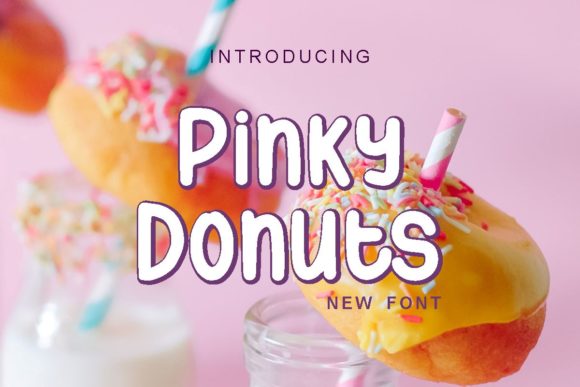
Pinky Donuts is a display font. In typography, display fonts are designed to be seen at large sizes. They are meant to grab attention, set a mood, or serve as a headline. They are rarely intended for long-form reading. The character of Pinky Donuts—with its rounded edges and playful structure—evokes feelings of nostalgia, sweetness, and informality. This makes it an amazing choice for:
- Children’s branding: Logos for toy stores, juice bars, or educational apps.
- Event invitations: Birthday parties, baby showers, or casual social gatherings.
- Marketing materials: Social media graphics, flyers, or promotional banners where immediate visual appeal is key.
- Product packaging: Labels for confectionery, crafts, or lifestyle products targeting a youthful demographic.
However, the very qualities that make Pinky Donuts charming—its irregular shapes and decorative nature—are what limit its utility. If you treat it as a general-purpose font, you risk confusing your audience and diluting your brand message.
Common Mistakes When Using Pinky Donuts
Even experienced creators sometimes fall into traps when integrating unique fonts into their workflow. Here are the most frequent errors associated with using Pinky Donuts and how they can negatively affect your results.
1. Overusing It for Body Text
The most critical mistake is using Pinky Donuts for paragraphs, articles, or detailed instructions. Because the letterforms are stylized and somewhat irregular, reading long blocks of text in this font causes eye strain and reduces comprehension. Readers may struggle to distinguish between similar characters, leading to miscommunication. For example, if you write a product description in Pinky Donuts, customers might misread specifications or pricing details, resulting in customer service issues or lost sales.
Better approach: Use Pinky Donuts exclusively for headlines, titles, or short accent phrases. Pair it with a clean, highly legible sans-serif or serif font for all body copy. This contrast creates a hierarchy that guides the reader’s eye and ensures your content is accessible.
2. Ignoring Kerning and Spacing
Display fonts often require manual adjustment of spacing (kerning) to look professional. Out-of-the-box, Pinky Donuts might have uneven gaps between letters, which can make text look sloppy rather than cute. Poor kerning disrupts the visual rhythm of your design, making it feel amateurish. In high-stakes environments, such as a logo for a serious business partnership, this lack of polish can damage credibility.
Better approach: Always check the spacing between individual letters after placing Pinky Donuts on your canvas. Adjust the tracking to ensure consistent visual weight. If the letters feel too cramped, add space; if they feel disjointed, tighten them slightly. Small adjustments make a significant difference in perceived quality.
3. Assuming Universal Compatibility
Not all devices and browsers render custom fonts identically. While Pinky Donuts is a standard TrueType or OpenType file, embedding it incorrectly can lead to inconsistent rendering across different platforms. Furthermore, if you send a PDF or image created with Pinky Donuts to a printer who does not have the font installed, the text may substitute with a default font, ruining your design. This is a common issue in print production that leads to wasted time and money.
Better approach: When working digitally, embed the font properly in your CSS or export your designs as high-resolution images or PDFs with fonts embedded. For print projects, always provide the font file to your printer or convert text to outlines (vector paths) before sending files. Verify the final output on multiple screens and devices to ensure consistency.
Evaluating Pinky Donuts for Your Specific Project
Before downloading or purchasing Pinky Donuts, take a moment to evaluate whether it truly fits your project’s goals. Ask yourself these questions:
- Is the tone appropriate? Does your brand voice align with the playful, sweet aesthetic of the font? If you are designing for a law firm or a medical clinic, Pinky Donuts will likely clash with the desired perception of trust and authority.
- Who is the audience? Is your target demographic responsive to whimsical design? For adults seeking serious information, this font may be distracting. For children or hobbyists, it may be engaging.
- What is the usage context? Will the text appear large enough to appreciate the font’s details? At small sizes, the unique features of Pinky Donuts may disappear or become illegible.
By answering these questions honestly, you can determine if Pinky Donuts is the right choice or if a more neutral display font would serve your needs better.
Practical Tips for Maximizing Impact
To get the most out of Pinky Donuts, consider these practical strategies:
- Pair strategically: Combine Pinky Donuts with minimal, geometric sans-serifs. The simplicity of the partner font allows the display font to shine without competition.
- Use color wisely: The "Pinky" in the name suggests soft pinks, but don’t limit yourself. Pastels work well, but bold contrasts can also create a striking modern look. Avoid overly busy backgrounds that compete with the font’s intricate shapes.
- Limit variety: Stick to one style within the Pinky Donuts family (e.g., regular, bold) unless you are creating a very specific typographic hierarchy. Mixing too many weights can clutter the design.
- Test for accessibility: Ensure sufficient contrast between the text and background. Even playful fonts must meet basic accessibility standards to be inclusive for users with visual impairments.
Conclusion
Pinky Donuts is a delightful addition to any designer’s toolkit, offering a unique way to inject personality into creative projects. However, its strength lies in its specificity. By respecting its limitations as a display font, paying attention to spacing and compatibility, and pairing it thoughtfully with other elements, you can avoid common mistakes and create designs that are both visually appealing and functionally effective. Take the time to evaluate your needs, plan your typography carefully, and let Pinky Donuts do what it does best: add a lovely, memorable touch to your work.